



Updated on: 2026-06-10
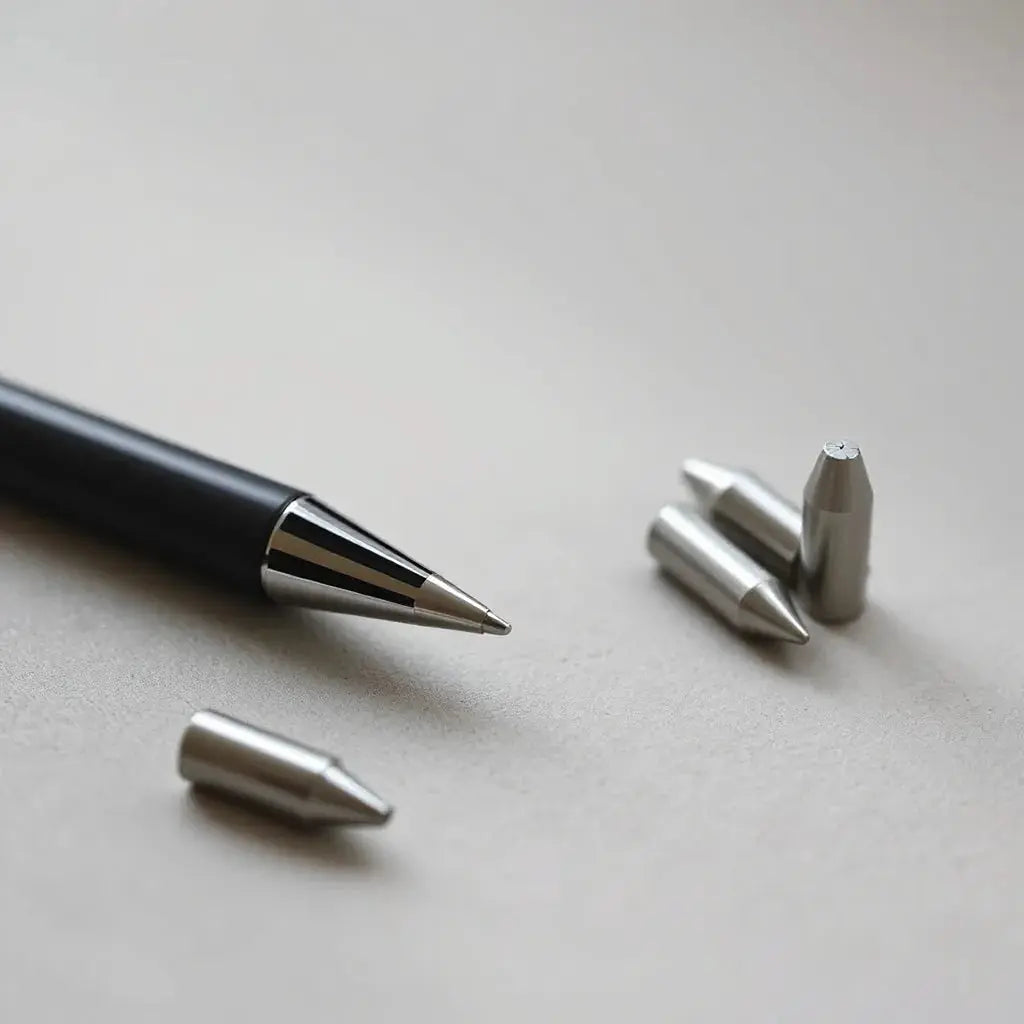
Apple Pencil metal tips help you achieve a more controlled feel for sketching, note taking, and fine detailing. This guide explains what metal tips change in day-to-day use, how to pick the right tip style, and how to maintain smooth performance over time. You will also find practical compatibility guidance and care habits that reduce skipping and uneven wear. Finally, the post includes a product recommendation and a short set of frequently asked questions.
Table of Contents
Introduction
Choosing the right tip can change how your digital work feels. For many creators, Apple Pencil metal tips offer a firmer, more precise interaction than standard nibs. If you write for long sessions, sketch with tight lines, or edit documents with controlled strokes, a metal tip can help you refine technique and reduce the frustration of inconsistent contact. This article covers the practical reasons people switch, plus the selection and care steps that matter most.
As a general rule, the best tip choice depends on your surface, your pressure habits, and the kind of work you do most. The goal is simple: stable contact, predictable glide, and consistent results from first stroke to last note.
Benefits & Reasons
Metal tips are popular because they tend to create a stable writing feel. Many users describe firmer control and clearer line definition during outlining, annotation, and detailed sketching. This can be especially useful when you want repeatable results across long sessions.
Another advantage is predictable tip behavior. When the contact is consistent, your hand can work with less micro-correction. That can improve comfort for people who rely on fine movements, such as architects, designers, students, and editors.
Metal tips also align well with certain screen protector choices. If you use a matte or anti-glare surface, the right tip type can help reduce wobble and keep strokes legible. For added screen protection, you may also explore anti-glare protectors that support comfortable viewing while reducing reflections.

Firm line concept shown by guide lines
Finally, metal tips can support durability goals. While every use pattern differs, many people choose metal tips to reduce the frequency of nib replacements. That does not eliminate wear, but it can make wear trends more manageable when your workflow is active and consistent.
How to Choose Apple Pencil Metal Tips
Choosing metal tips is not only about material. It is also about how the tip interacts with your screen and the way you move your stylus. The following factors will help you make a practical decision.
1. Focus on surface compatibility
Tip performance is tied to the surface you draw on. A smooth glass-like screen can feel different than a textured matte protector. If you notice frequent skipping or overly fast glide, the problem often comes from a mismatch between tip behavior and surface texture.
2. Evaluate the level of precision you need
Metal tips are often chosen for controlled line work. If your workflow includes thin lettering, grid drawing, or diagramming, prioritize stability and consistent contact. If your workflow is mostly broad shading, you may want a tip style that balances glide with control.
3. Consider replacement cadence and storage
Many people prefer a multi-pack option so they can rotate tips during heavy use. Rotating can help you keep a consistent feel across sessions. It also makes it easier to replace a worn tip quickly when you are in the middle of a project.
4. Confirm that the tip style is designed for your pencil model
Different generations and accessory ecosystems can require different tip systems. Verify the product description and ensure the tip set is intended for your exact stylus.
Installation and Care for Reliable Performance
Correct installation affects contact and long-term reliability. The safest approach is to follow the accessory instructions included with your tip set. If you install a metal tip without proper alignment, you can increase uneven wear or trigger inconsistent tracking.
Handle tips with careful cleanliness
Before installation, clean the tip area gently. Dust and residue can alter friction and create micro-lift during contact. Use a dry, soft cloth and avoid aggressive solvents. If you work in a dusty environment, periodic cleaning becomes more important.
Use controlled pressure
Even when a metal tip feels firm, excessive pressure does not improve line quality. Heavy force can increase wear and can also change the way your strokes register. Aim for steady pressure that matches your intended line thickness.
Maintain a consistent screen protector surface
A screen protector that is peeling, lifting, or scratched can reduce contact consistency. If your screen surface is damaged, a tip upgrade cannot fully compensate. If you are selecting a protector, choose a reliable option and apply it carefully.
Monitor for signs of mismatch
Common indicators include skipping at the start of a stroke, unexpected friction spikes, or lines that feel uneven across the screen. If these issues appear, check alignment, clean the tip, and verify your protector condition.
Compatibility Considerations
Compatibility is the difference between a smooth upgrade and ongoing frustration. Metal tips should fit correctly and respond as expected with your stylus. Before purchase, confirm the intended pencil model and ensure the tip design matches the connector system used by your device.
It is also wise to consider your protective setup. If you use a premium case or a device stand, stable positioning can help you maintain consistent angles while writing. Some users also benefit from protecting the iPad screen and the stylus charging area with a proper accessory ecosystem.
If you are building an end-to-end setup, you may find it useful to pair the stylus with a dedicated iPad cover. A stable device reduces accidental movement, which improves line accuracy regardless of tip material.
Best Practices for Writing and Sketching
You can get more performance from metal tips by adjusting your workflow slightly. The goal is to match your technique to the physical behavior of the stylus.
Keep your posture and stroke angle consistent
Stylus contact changes with angle. If you shift your hand angle between tasks, you may perceive different friction even with the same tip. Consistent posture supports stable results.
Calibrate mentally for glide and feedback
Metal tips can change how the stylus glides. Allow time to adapt. When you transition from a softer nib, your first strokes may look slightly different. With a brief adjustment period, the feel often becomes predictable.
Use layers for corrections instead of repeated retracing
Retracing over the same line many times can wear the tip unevenly. In drawing apps and note-taking workflows, consider using layers or undo tools so that you reduce repeated friction at the same spot.
Rotate tips during long projects
If you maintain a multi-tip set, rotating helps preserve a consistent feel. Some tips settle into their most stable glide after a short period of use, while others may be better for finer outlining.

Rotation concept shown by three labeled arrow directions
Recommended Product
If you want a practical starting point, consider a multi-pack tip set so you can trial different styles and keep spares available. One option available from Moarmouz is designed to support ongoing use without interruptions.

PaperType Pencil Tips 2 (assorted)
For additional screen protection and reduced glare, you may also explore related accessories on the store. If you want a clean writing experience, pairing tips with a thoughtful screen protector strategy can improve readability and comfort. For device organization, some users also prefer a protective sleeve while transporting a tablet and stylus.
For a separate accessory category that many creators also use, you can browse Mixora for creative-focused products. This recommendation is optional and not required for tip performance.
FAQ
Are Apple Pencil metal tips compatible with every iPad model?
No. Compatibility depends on your Apple Pencil generation and the exact tip design. Always confirm the tip set is specified for your stylus model before installation. If you are unsure, review the product details carefully and match the listed compatibility to your device.
Why does my stylus skip even after switching to metal tips?
Skipping often comes from a surface mismatch, a protector that is damaged, or alignment during installation. Clean the tip and check the screen protector for lifting or scratches. Also verify that the tip is fully seated and correctly oriented, since partial seating can create inconsistent contact.
Do metal tips require different care than standard nibs?
Care principles remain similar. You should keep the tip area clean, avoid excessive pressure, and maintain your screen surface in good condition. If you frequently draw on a textured protector, periodically inspect the protector edges and replace it if it begins to peel.
Final Thoughts & Recommendations
Apple Pencil metal tips can improve control, line consistency, and the overall feel of writing and sketching. The real outcome depends on match quality: the tip must fit your stylus, and it must pair well with your screen protector surface. When compatibility is correct and care habits are consistent, you can expect a more reliable interaction from the first stroke to the final edit.
If you are upgrading your setup, start with careful selection, clean installation, and a protector that supports stable contact. For related device protection, consider exploring a case or sleeve options on bags and sleeves to keep your workflow gear protected while you work.
Soft recommendation: choose one tip set that matches your stylus, test it on your most used screen surface, and then refine your workflow with small technique adjustments.
About the Author
Moarmouz is a content and commerce-focused team specializing in tablet accessories and workflow optimization. The author’s expertise includes stylus accessories, screen protection strategy, and practical buying guidance for everyday creators. This post is designed to help you select and maintain Apple Pencil metal tips with confidence. Thank you for reading, and may your next session feel consistent and controlled.
Disclaimer: This article is for general information only. Product compatibility and performance can vary by device generation, software version, screen protector type, and user technique. Always follow the manufacturer instructions and verify fit before use.
Share:
Best iPhone Cases in 2026: Styles and Models to Explore
Essential MacBook Air M1 Accessories for Everyday Use