



Updated on: 2026-07-06
Choosing laptop bags is more than a styling decision. The right bag protects your device, keeps your workflow organized, and reduces wear on your hardware and accessories. This guide explains how to match bag size, materials, compartments, and carry comfort to your actual routine. You will also learn which design choices commonly cause frustration and how to select a bag that fits travel, commuting, and daily storage needs.
- How to Choose Laptop Bags for Your Needs
- Common Mistakes to Avoid
- Pros & Cons Analysis
- Quick Tips
- Wrap-Up & Key Insights
- Q&A Section
- About the Author
How to Choose Laptop Bags for Your Needs
Many professionals treat their laptop as a working hub. When you move it every day, the bag you use becomes part of the equipment. Laptop bags should do four primary jobs: secure the device, protect against everyday impacts, organize essentials, and provide comfortable carry during short or long commutes. If any of these areas are weak, you may notice it quickly through scratches, loose chargers, or fatigue from poor strap design.
Start with capacity. Measure your laptop and then consider its real-world dimensions with the lid fully closed. Laptops often have variable thickness due to bezels, protective sleeves, or attached devices. A bag that fits your laptop tightly can limit easy insertion and removal, while a bag that is too large can allow movement that transfers shock to the device. The most reliable approach is to choose a bag whose internal dimensions are close to your laptop footprint and that includes cushioning to prevent direct contact with the outer shell.
Next, evaluate protection strategy. Look for a padded compartment with a structured back panel or reinforced walls. Interior padding should reduce point impacts when the bag is set down on hard surfaces. If you frequently commute on public transit or walk long distances, consider a bag with both impact cushioning and surface resistance. Weather protection matters as well. A water-repellent exterior can help during light rain, but you should also check for sealed zippers, flap coverage, or internal barriers that reduce moisture penetration.
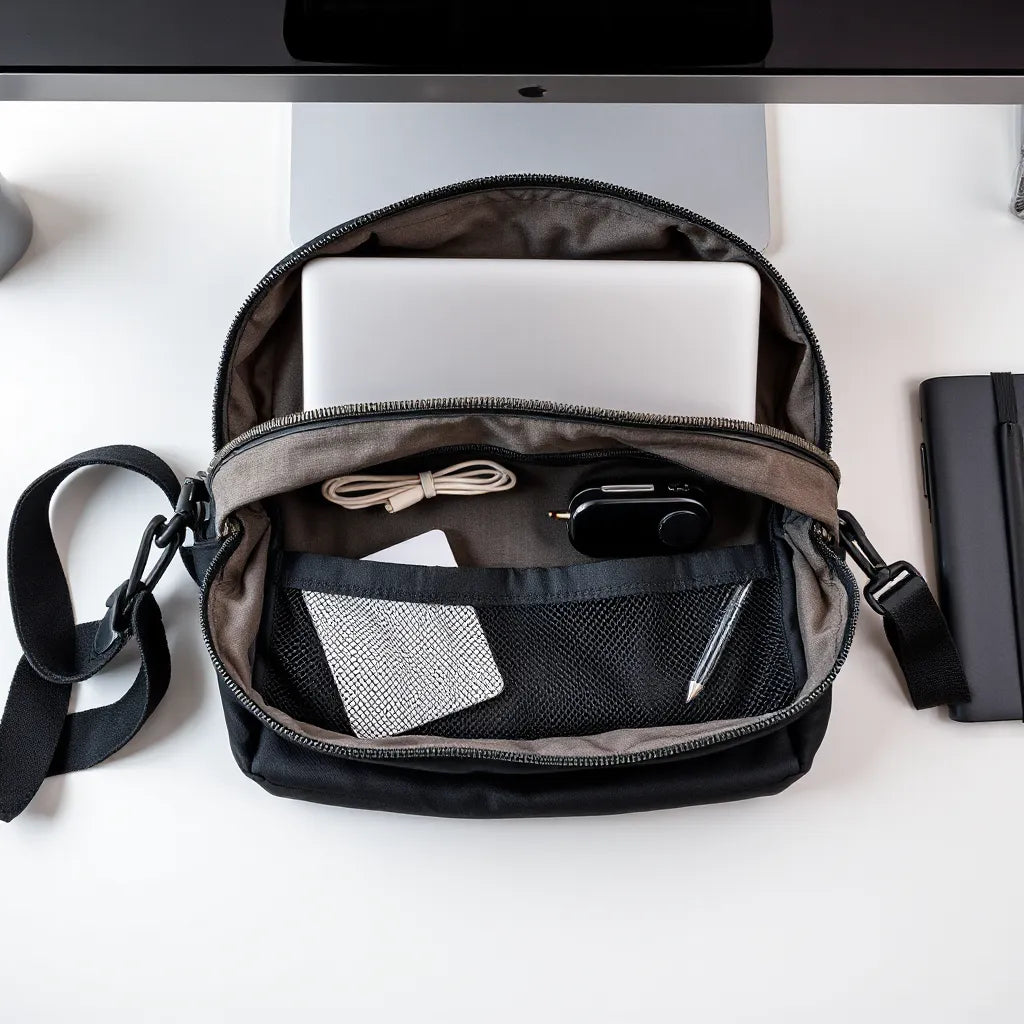
Then assess organization. A practical bag reduces time spent searching. Compartments for chargers, cables, and small accessories allow you to pack intentionally. Some bags include sleeves for tablets or documents, plus side pockets for quick access items such as a phone, keys, or transit cards. If you rely on peripherals, prioritize compartments that separate them from the laptop compartment, so cables and chargers do not press against the screen edge area.
Carry comfort influences how often you will actually use the bag. Adjustable straps, breathable back panels, and padded handles reduce strain. If you carry a heavy load, look for a wide strap design and ergonomic padding. For frequent travelers, weight distribution becomes even more critical. A bag that sits close to your center of gravity typically feels more stable than a bag that swings or shifts while walking.
While bag selection focuses on comfort and structure, device protection should be layered. For additional screen safety, a compatible anti-glare or privacy solution can help during bright environments. You can explore options such as anti-glare screen protectors for supported laptop and device models. For users also managing Apple devices, pairing a well-designed bag with screen protection improves the overall reliability of your setup.

Shielded compartments and padded layers for impact defense
Match compartments to your daily workflow
Compartment design should reflect what you carry. If your routine includes only a laptop and charger, a streamlined layout with a single padded laptop bay and one accessory pocket may be sufficient. If your day includes meetings, you may need space for a notebook, pens, and a phone. If you bring a tablet, research materials, or a portable monitor, choose a bag that provides a separate compartment so different items do not rub against the laptop.
Consider cable management. Loose cables can create pressure points and add clutter. Bags with dedicated cable routing or pockets for chargers keep items contained. For professionals who also maintain a desk setup at home or at work, a bag with a cable-friendly internal layout helps you transition quickly without repacking from scratch.
Finally, confirm compatibility with your bag-lifestyle. If you use a backpack during the commute and switch to a briefcase for office presentations, a hybrid design can reduce the need to carry multiple items. If you use public transportation, prioritize a bag style that stays stable and is easy to open while seated. Zipper placement and access direction matter during transit.
Common Mistakes to Avoid
Choosing laptop bags involves trade-offs. The most common errors are not about aesthetics; they are about fit, structure, and usability. Avoiding these mistakes helps you select a bag that protects your device and supports a consistent routine.
Buying by screen size alone
Many shoppers rely on a laptop’s marketed screen size, such as 13-inch or 15-inch models. Screen size does not always map precisely to internal bag dimensions, especially when padding thickness differs. Instead, verify internal compartment measurements and confirm that the bag accommodates your laptop’s actual height and width with any protective sleeve or accessories installed.
Ignoring padding quality and placement
Some bags appear padded but provide minimal cushioning where impact risk is highest. Look for padding in the back panel area and around the sides, not only on the base. If padding is uneven, the laptop can shift within the compartment and experience repeated micro-impacts that build up wear over time.
Overpacking to compensate for missing compartments
When a bag lacks organization, users tend to overstuff pockets. This compresses the laptop area and can stress zippers. It also increases the chance that chargers or adapters press against the laptop surface. A bag with purposeful compartments can prevent this cycle by separating items from the device compartment.
Choosing straps without testing comfort
Strap comfort is a performance factor. A bag may look ideal in a photo, but poor padding or narrow straps can cause discomfort during longer walks. Before purchase, review strap width, adjustability, and back-panel ventilation. Comfort is also about stability; if the bag shifts, you may end up correcting it constantly.
Relying on the bag for full weather resistance
Water exposure is often unpredictable. A bag with basic fabric may handle light splashes but can still allow moisture through seams during sustained rain. If you commute in wet conditions, prioritize water-repellent materials, zipper coverage, and internal barriers that help reduce moisture risk.
Pros & Cons Analysis
Different categories of laptop bags address different priorities. The goal is not to select a single “best” style for everyone, but to pick the option that matches your carry habits, organization needs, and comfort requirements.
Messenger-style laptop bags
- Pros: Quick access for side loading, often a good balance between storage and professional appearance.
- Pros: Useful for commuters who prefer a single-strap feel and a stable carry at waist level.
- Cons: Shoulder comfort can degrade if you carry heavy loads for long periods.
- Cons: Side access may be less secure if the bag is frequently moved in crowded spaces.
Backpack laptop bags
- Pros: Improved weight distribution due to two-strap carry.
- Pros: Hands-free convenience for travel, walking, and multitasking.
- Cons: Some models can be bulky when packed with accessories.
- Cons: Side openings may not be as fast to access as messenger-style designs.
Sleeve and slim-carry hybrids
- Pros: Minimal bulk and easy insertion into a larger travel bag.
- Pros: Often simple and lightweight while still providing basic cushioning.
- Cons: Limited accessory storage compared with structured laptop bags.
- Cons: Reduced standalone protection if set down without support.
Pros for durability and long-term use
- Pros: Reinforced stitching, structured panels, and durable outer fabrics extend bag life.
- Pros: Better hardware such as smooth zippers and sturdy handles supports daily use.
- Cons: Higher-quality materials often cost more initially.
- Cons: Overly rigid interiors can reduce packing flexibility when you carry additional items.
If you also maintain a desktop-compatible setup with screens and accessories, consider protecting other components as well. For example, external device cases and cable organization can reduce friction when transitioning between home, office, and client meetings. You can browse bags and sleeves for laptops and tablets to compare structured options and sleeve-based alternatives.

Organized pockets representing cable and accessory separation
Quick Tips
Use these steps to choose laptop bags with less uncertainty. They are designed to reduce decision fatigue while improving the odds that the bag fits your real routine.
- Confirm internal dimensions: Verify the padded compartment size, not just the labeled screen range.
- Look for structured cushioning: Prioritize protective panels around the sides and back.
- Separate accessories from the laptop: Use dedicated pockets so chargers and adapters do not press on the device.
- Evaluate closure quality: Smooth, secure zippers reduce snagging and improve access during daily use.
- Check strap adjustability: Ensure straps can be tailored for your height and carry preferences.
- Plan for weather exposure: Choose water-repellent fabric and consider internal protection if rain is common in your commute.
- Test the bag’s “set-down” stability: Place the bag on a tabletop and confirm it does not force the laptop toward the outer shell.
- Consider compatible add-ons: Screen protectors and device cases add layer protection without replacing bag fundamentals.
How to pack efficiently once you own the bag
Even the best bag can underperform with poor packing habits. Keep the laptop securely nested in the padded compartment. Place cables and chargers in accessory pockets, ideally where they will not create pressure against the laptop surface. Use a small organizer pouch for adapters and frequently used peripherals. If your bag includes a side pocket for a phone, avoid placing bulky items that could distort the laptop compartment as the zipper closes.
When traveling, keep the bag off the floor where possible. Over time, floor contact can accelerate wear on fabric and increase exposure to grit. If you use a separate protective sleeve, position it correctly inside the bag so it remains stable and does not slide around.
If your workflow includes Apple accessories alongside the laptop, pairing compatible protection for nearby devices can improve consistency. For instance, you may use protective solutions for smart devices and displays, and you can also review relevant collections like MacBook hardshell cases when you need extra impact resistance. The goal is a layered approach: bag structure for everyday movement and secondary protection for high-risk points.
Wrap-Up & Key Insights
Laptop bags are a practical investment in device protection, daily comfort, and organization. The most dependable choices come from matching internal dimensions to your laptop’s real footprint, selecting structured padding where impacts happen, and using compartment design that fits your workflow. Avoid buying solely by screen size, overpacking into a single space, or ignoring strap comfort. When you combine a well-designed bag with appropriate device protection, your laptop stays more stable during commuting, work sessions, and travel.
If you are ready to refine your setup, start by assessing what you carry each day and compare that list to the bag compartments available. Then validate fit, padding, and comfort using the criteria in this guide. A thoughtful selection now reduces wear later and makes your routine more efficient.
Q&A Section
What size laptop bag should I buy?
Select a bag based on internal compartment measurements and your laptop’s real dimensions, including any added thickness from protective elements. If you use a sleeve, account for it when comparing bag padding and available space. When in doubt, choose a fit that prevents noticeable movement while allowing easy insertion.
Are backpacks better than messenger bags for laptop protection?
Both styles can protect well when they include padded, structured compartments. Backpacks often distribute weight more evenly, which can improve comfort and reduce shifting while walking. Messenger-style bags may offer quicker access and a more compact profile, but strap comfort and stability depend heavily on the design and how much you carry.
How can I keep my laptop safer from daily impacts?
Prioritize bags with cushioning around the sides and back, secure compartments that limit movement, and reliable closures that prevent accidental openings. Also pack accessories in separate pockets so they do not press against the device. For additional surface protection, consider compatible screen protectors designed for your device model.
About the Author
Moarmouz Team
Moarmouz is a brand focused on protective accessories, with expertise in building practical solutions for everyday tech carry. The team regularly evaluates usability factors such as fit, organization, and durable materials so customers can make confident choices. Thank you for reading, and we encourage you to select a bag that matches your routine, not just your laptop model.
Share:
MacBook Accessories That Improve Everyday Productivity
Tech Accessories Checklist for Everyday Smarter Use